Tasks
To-do lists for each page and for the whole site, from the backoffice header.
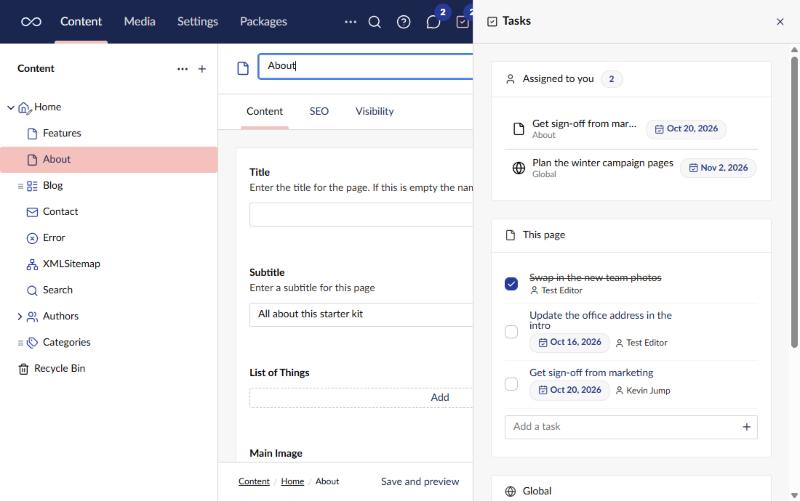
Turn the tool on from its card on the Power Toys dashboard. A tasks icon then appears in the header for every user, with a badge for open tasks assigned to you. It opens a panel beside the page, which stays open while you move around the site, with:
- Assigned to you - your open tasks from every page and the global list, soonest due first. Mark one done from here, or open a page’s task to go to that page.
- This page - the tasks on the document you have open. Only shown while a saved document is open.
- Global - tasks that aren’t about one page, such as “Review the site navigation”.
Each task has a title, and can be given someone to do it and a due date. Tasks can be reordered, ticked off and deleted. Every open panel updates as soon as anyone changes a task. When a task is assigned to you, you get a notification.
Who can do what
- A page’s tasks follow the page: anyone who can browse the page sees its tasks, and anyone who can update it can change them.
- Everyone sees the global tasks. Changing them needs the Manage global tasks permission.
Tasks adds its own permissions to the user group editor, under the Tasks permissions heading. Administrators get them on install; other groups get none.
- Manage global tasks
- See everyone’s tasks
- Manage review rules
Content reviews
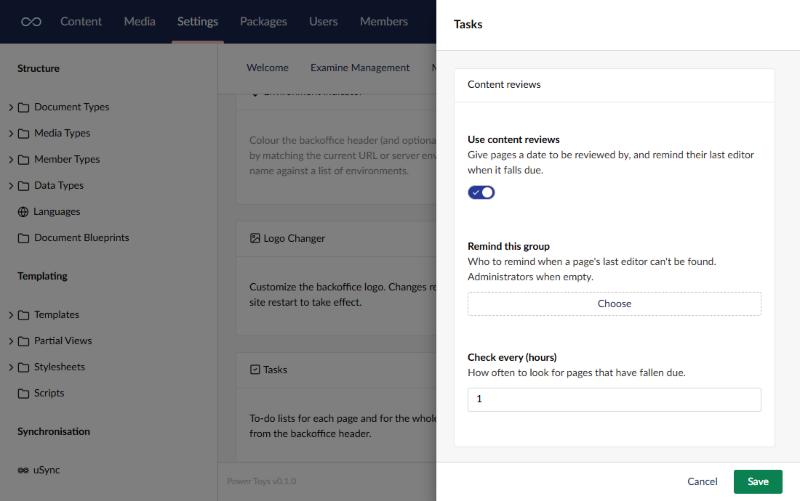
Content reviews give pages a date to be reviewed by. They’re part of Tasks, and off until you switch them on in the Tasks card’s settings.
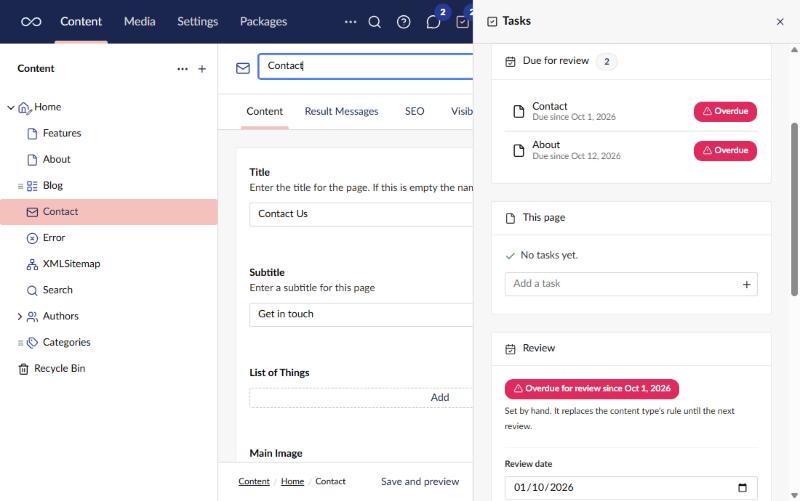
Once on, the panel gains two more boxes:
- Due for review - pages that have fallen due and that you edited last, soonest first.
- Review - for the page you have open: when it’s due and where that date came from, a date you can set by hand, Mark as reviewed with an optional note, and the reviews so far.
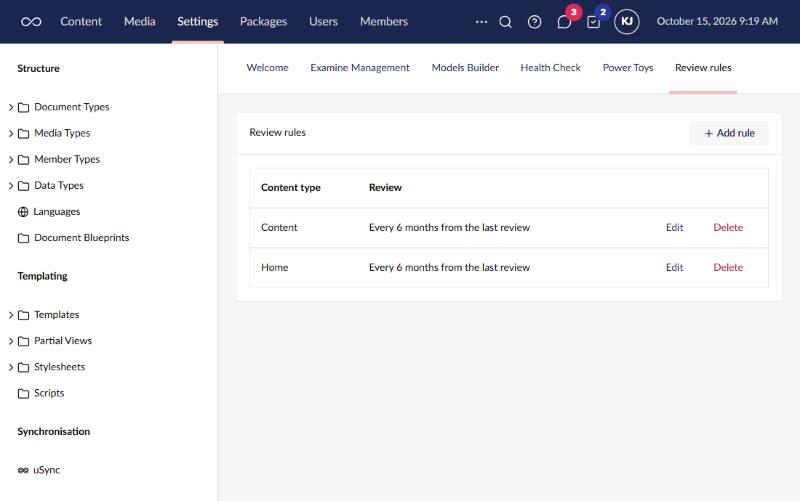
A page gets its date by hand, or from a rule for its content type: “every 6 months from the last review” or “from the last publish”. Rules live on the Review rules dashboard in the Settings section, for users with the Manage review rules permission. A date set by hand wins over the rule until the page is next reviewed. Adding a rule gives existing pages of that type the full interval from today, so nothing is overdue straight away.
When a page falls due, its last editor is reminded once, with a notification if they’re signed in. When the last editor can’t be found, the group chosen in the settings is reminded instead (Administrators if none is chosen). The settings also say how often, in hours, to look for pages that have fallen due.
With BackChat
Tasks works on its own. When the BackChat power toy is on as well, assigning or completing a page’s task also posts a line in that page’s chat, and an assignment counts as a mention for the person it’s assigned to. Marking a page reviewed, and a page falling due, post a line there too.
Notes
- Deleting a page deletes its tasks. Moving it to the recycle bin keeps them, so a restore brings them back.
- Tasks are stored in the site’s database. Turning the tool off keeps them.